
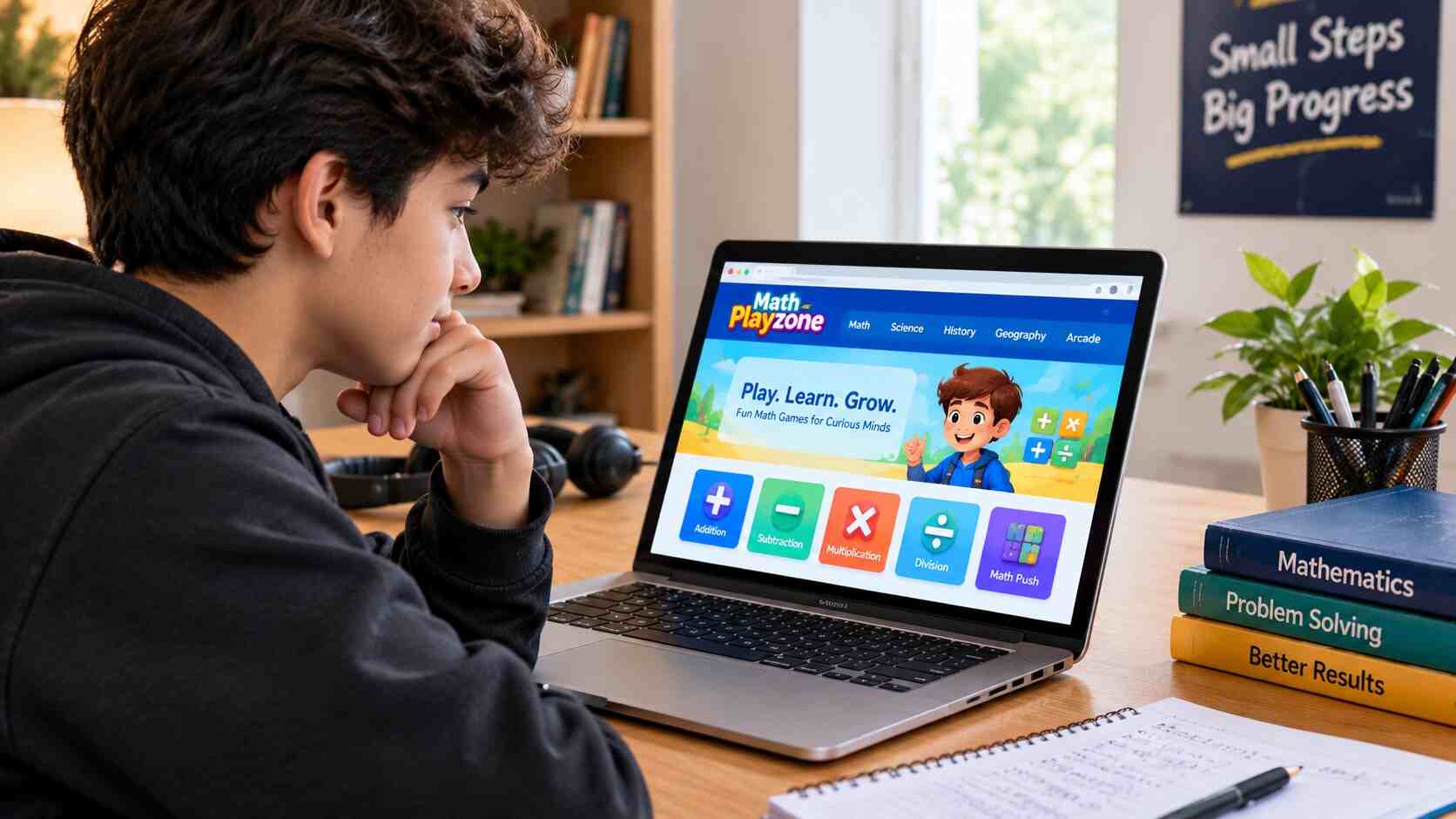
Math Playzone: Games, Age Limit, Safety and How to Use It Properly
Search for Math Playzone and you’ll get a muddle of answers. One article calls it a learning app for little kids. Another lists games that don’t seem to exist on the site. A third swears it’s built for ages 4 to 12.
We opened the site itself instead. This guide covers what Math Playzone really is, which math games you’ll find there, who it’s meant for, what its privacy policy says, and how to get something out of it besides a few minutes of distraction. Everything below was checked against the site’s own pages in late October 2026.
Math Playzone at a Glance
| Detail | What we found |
|---|---|
| What it is | A browser game website with an education section and an arcade |
| Sections | Math, Science, History, Geography, Arcade |
| Math games | 9 in the Math category |
| Intended age | 13 and older (Terms of Use and Privacy Policy) |
| Cost | No pricing shown; advertising is disclosed |
| Accounts | Not needed to browse; contact forms and comments collect a name and email |
| Servers | United States, per the privacy policy |
What Is Math Playzone?
Math Playzone is a gaming website that tucks math, and a few other school subjects, inside quick browser games. You open a page, skim the description, and play. Nothing to install.
What trips people up is the name. It isn’t only about math. The menu runs across Math, Science, History, Geography and Arcade, and that last one is plain entertainment. Plenty of games in it teach nothing at all.
So if you’re a parent, teacher or student hunting for focused practice, think of it as a game portal with a learning corner. There are no lessons, no placement test and no progress reports. It’s a place to drill, not a place to be taught.
The Website and the App Are Different Things
There’s also an iPhone and iPad app called Math Playzone: KS1–GCSE Maths, published by DEVWORLD VIETAM COMPANY LIMITED. Its App Store page describes something quite different from the website: algebra, calculus, trigonometry, an AI problem solver, a graphing calculator, video lessons. It’s free to download, but it carries ads and in-app purchases that ran from about $1.99 to $59.99 when we looked. KS1 and GCSE are UK school stages, from early primary through the exams taken around age 16.
Nothing on either page ties the app to the website. Same name, separate products.
The 9 Math Games
Here’s the full Math category, going by the site’s own descriptions.
| Game | What you do | Skill |
|---|---|---|
| Math Push | Push numbered blocks into place to build expressions that match the values on barricades blocking an exit portal | Number relationships, planning ahead |
| Math Boy | Solve equations to stop enemies from attacking a sword-wielding boy; pick addition, subtraction, multiplication, division or a mix | Mental arithmetic under pressure |
| Quiz Math | Decide whether a shown equation is true or false before the clock runs out | Quick checking |
| Let’s Reach 1000 | Keep adding each new number to a running total until you hit 1,000 | Fast addition |
| Let’s Reach Zero | Subtract each new number from your total until you reach 0 | Fast subtraction |
| Addition | Choose the right sum before time’s up | Addition facts |
| Subtraction | Choose the right difference before time’s up | Subtraction facts |
| Multiplication | Pick the correct product against the clock | Times tables |
| Division | Solve division problems against the clock | Division facts |
Two of them deserve a closer look. Math Push is the most interesting of the bunch, because most online math games are just speed drills, and this one makes you think a few moves ahead. That exercises reasoning, not only recall. Math Boy is the best all-rounder since you choose the operation. If you’re stuck on times tables, you can stay in multiplication mode all afternoon and never touch anything else.
The four plain operation games are exactly what they look like: timed drills. They’re fine for building speed on facts you already understand. They won’t tell you why an answer is right, which is a real limit if you’re still confused about the method.
Science, History and Geography
The other educational sections are smaller. Science has The Brain Lab (an endless runner built around solid, liquid and gas states), Smarty Pants: Science Quiz, and The Magic of Science, which has 30 levels. History gets Smarty Pants: History Quiz. Geography has Smarty Pants: Geography Quiz and Flags Maniac, where you identify flags.
Think of these as quick knowledge checks. A geography quiz will show you what you already remember, but it can’t teach you where a country is if you’ve never looked at a map.
The Arcade
This is where the site turns into straight entertainment: puzzle, racing, sports and platform games, the usual browser-game mix. The lineup shifts over time, so we won’t name specific titles. If you’re there to learn, treat the Arcade as a reward for finishing your practice, not as part of it. A puzzle game might sharpen your focus, but that’s not the same as math practice.
What Age Is Math Playzone For?
Many online guides get this one wrong. The site’s Terms of Use say it’s designed for users aged 13 and older, and by visiting you confirm you’re at least 13. The Privacy Policy repeats that and adds that the site doesn’t intentionally collect personal information from children under 13.
The bright colors and cartoonish games make it look like a site for young kids, but the site says otherwise. It suits middle and high school students who want a lighter way to keep their mental math sharp. Parents of younger children should look for platforms built for that age group. Teachers should check their school’s technology and privacy rules before putting any ad-supported game site in front of a class. If you’re curious how school-friendly browser game sites work more generally, our guide to Classroom15x and browser-based gaming sites is a useful companion read.
Is Math Playzone Safe? Privacy and Ads
“Safe” means different things to different people, so here’s what the Privacy Policy (last updated December 29, 2025) actually says.
If you submit a contact form or leave a comment, the site may collect your name and email. It also collects some information automatically: your IP address, browser and device details, operating system, language, referring URLs, country, and how you use the site. The policy mentions targeted advertising, ad networks and tracking technologies, and says advertising is managed in whole or in part by Playwire LLC. It also uses Google Analytics and explains how to opt out. Servers are in the United States.
None of that is unusual for a free, ad-supported game site. It’s still worth knowing before you hand the link to a teenager. Don’t put personal details in comments, ignore any pop-up that tells you to download something to keep playing, and consider a browser with tracking protection. Policies change, so read the current version yourself if privacy matters to you.
How to Get Real Practice Out of It
Playing a game and learning something are two different activities, and the gap between them is where most people lose their time. A few things help.
Match the game to the problem. Working on addition facts? Use Addition or Let’s Reach 1000. Subtraction? Subtraction or Let’s Reach Zero. Times tables are a job for Multiplication or Math Boy in multiplication mode, and division works the same way. If you want to build reasoning instead of speed, go to Math Push. Quiz Math is good for training yourself to spot a wrong answer quickly.
Then keep it short. Ten to fifteen minutes, three times a week, on whatever you’re covering in class, will do more than one long Sunday session. Keep scratch paper next to you and write down every question you miss. If you miss the same kind twice, close the game and go back to your textbook or ask a teacher, because replaying the level won’t fix a misunderstanding. Saying answers out loud also helps more than you’d expect. Explaining your thinking is what turns repetition into understanding.
The American Academy of Pediatrics recommends that families build a family media plan with consistent limits on how much and what kind of media kids use, so screens don’t crowd out sleep, exercise and other healthy habits. It applies here: decide before you start how long the session lasts and what it’s for.
The Honest Verdict
Math Playzone does a few things well. It loads instantly, the nine math games feel different from one another, and Math Boy lets you aim at the exact operation you need. Add the science, history and geography sections and there’s enough variety to keep a restless teenager from getting bored.
The downsides are real, though. There are no explanations, no progress tracking and no step-by-step help. It’s ad-supported. It’s meant for ages 13 and up. And because the Arcade sits one click away from the learning games, it’s very easy to wander off. Whether that last point bothers you depends on how much self-control the person at the keyboard has.
Frequently Asked Questions
What is Math Playzone?
A browser-based game website with math, science, history and geography games plus an arcade. It isn’t a full online course.
Is Math Playzone free?
The site shows no pricing, and its privacy policy discloses advertising, which suggests ads pay for it. The separate iOS app with the same name has in-app purchases.
What age is Math Playzone for?
Its Terms of Use and Privacy Policy say it’s designed for users 13 and older.
Is Math Playzone safe?
It publishes terms and a privacy policy and discloses analytics, cookies and advertising. As with any ad-supported site, avoid sharing personal details and be wary of unexpected downloads.
Which math game should I start with?
Try Math Boy if you want to choose the operation, or the Addition game if you’re rebuilding basic facts. Move on to Math Push once those feel easy.
Can it replace math class or tutoring?
No. It’s good for repetition and variety, but it doesn’t teach concepts or diagnose mistakes.
Is the Math Playzone app the same as the website?
Nothing on either page connects them. The app is a separate product aimed at UK school stages, with ads and in-app purchases.
Final Thoughts
Math Playzone is a simple, ad-supported game portal with a decent set of math games and a lot of general entertainment around them. It works best as short-burst practice for teens who find worksheets dull. It won’t replace real instruction, it isn’t built for young kids, and plenty of what’s on it isn’t educational at all.
Pick your games on purpose, keep sessions short, and go back over the questions you get wrong. Do that and it can make practice feel a lot less like a chore.



One Comment